Android App on Google Play Store is stuck and not downloading error installing on Samsung Phone

I had an issue where Android Apps would not finish downloading on the Google Play Store on a Samsung phone (s9+) – I tried deleting the cache, clearing data on Google Play Store and Play Services, and it still was hanging and not working – resetting the phone multiple times

I then tried opening the Samsung Store – which prompted an update, then updated a bunch of apps in there, and then the Play Store started working again (for some reason)

Smileupps & CouchDB

CouchDB is a great way to have a self-managing version controlled database – which keeps things in sync and in the right state – perfect for multiple users, multiple hardware sources all updating the same records of the database at the same time – IE an online service, registration list or other app.

Smileupps provides a free or paid hosting service for CouchDB, as well as other IT Business Solutions

I am currently using CouchDB as an engine and merging it with a web-based front end I made for a door-list ticketing app, with easy to see searchbox, guest list and here/not-here check boxes – instant name filtering and search clearing.

A great example app you can use to start testing is here on GitHub:

https://github.com/nolanlawson/pouchdb-getting-started-todo

Fountain Pen Series, Classics

Personally, I’d group fountain pens into 4 series-es, with some famous/ classic pens in each as follows:

  • Entry level $30 – $60 – Steel nibs, plastic body
    • Lamy Safari
    • Twisbi Echo
  • Mid-tier $100 – $300 – Gold nibs
    • Pilot VP
    • Lamy 2000
    • Pelikan M800
    • Rotring 600 (steel, discontinued)
  • Expensive pens $400 – $1,000 – Larger size
    • Montblanc 149
    • Visconti Homosapiens
    • Pelikan M1000
    • Conid
    • Graf von Faber-Castell Classic
  • Super-Luxury Extra Something Level – $1,500+ – Limited edition, rare
    • Omas Arco
    • Visconti Divina Proporzione
    • Montblanc Hemmingway
    • Namiki / Nakaya Urushi

For inks, I’d say the most famous is Pilot Iroshizuku Kon-peki.

It’s blue, so will be the most mainstream, because people can use it daily even for business writing – it’s a generic standard blue – nice and bright with good shading – many many people seem to love it a lot. Then maybe Sailor Jentle Yama-dori – sheening turquoise. 

For non-standard, Iroshizuku Yama-budo, Noodler’s Apache Sunset/ Golden Brown/ Black Swan in Australian Roses

New Qantas Logo 2017 Colour Black White Vector

The Qantas website doesn’t offer Logo Assets – even though the logo is not protected under copyright – but trademark laws.

People are going to be using their old logo in press releases and marketing unless the new logo is easily accessible.

Here are the logos in color, black and white in PNG and Vector format. The source is a vector of the colour version provided by Wikimedia – if you find official versions – please let me know.

PNG Images

Qantas airlines logo 2017 colour color png image

Qantas airlines logo 2017 black white png image

Qantas airlines logo 2017 black white png image

Vectors

Qantas airlines logo 2017 colour color vector svg ai esp image

Qantas airlines logo 2017 black white vector svg ai esp image

Qantas airlines logo 2017 black white vector svg ai esp image

How to add recaptcha to PHPLIST

PHPlist is a great free PHP based mailing list installation you can add to your server, like WordPress – also running with MySQL. This has been added to version v3.2.7.

Note that if you upgrade your installation, you will need to add this again – and completely new versions of PHPLIST may change how they work, though it shouldn’t be so drastic as to render this all unusable. 

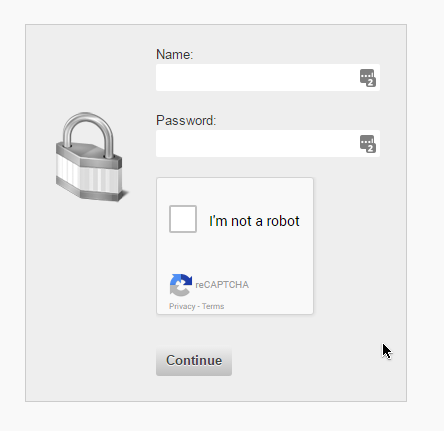
Admin login

Open /list/admin/login.php

at the bottom of the file, add this code before the submit button:

 echo ' <tr><td><script src="https://www.google.com/recaptcha/api.js" async defer></script><div class="g-recaptcha" data-sitekey="###YOUR-SITE-KEY###" data-size="compact"></div><br /><input class="submit" type="submit" name="process" value="' . $GLOBALS['I18N']->get('Continue') . '" /></td></tr>';

Note this ‘name=process, get->Continue input appears in 2 places

Then open /list/admin/index.php and search for this code, adding what’s in green, replace the red text with your own ID, Classes and Google ID codes.

 if ((!isset($_SESSION['adminloggedin']) || !$_SESSION['adminloggedin']) && isset($_REQUEST['login']) && isset($_REQUEST['password']) && !empty($_REQUEST['password'])) {

 /*RECAP*/
$captcha = "";
if (isset($_POST["g-recaptcha-response"])){
 $captcha = $_POST["g-recaptcha-response"];
}
if (!$captcha){
 echo '<p style="color:#fff;padding: 25px; background-color: #2f2f2f;">Please complete the captcha to prove you\'re not an internet virus robot <a href="'. $_SERVER['REQUEST_URI'] .'" id="pushkacombutton" >Go Back</a></p>';
 exit;
 return; //this switches off the index file - so it shows a blank page. I'll try change it to just break out of this if clause
}
// handling the captcha and checking if it's ok
$secret = "###YOUR-SITE-SECRET-KEY###";
$response = json_decode(file_get_contents("https://www.google.com/recaptcha/api/siteverify?secret=".$secret."&response=".$captcha."&remoteip=".$_SERVER["REMOTE_ADDR"]), true);
// if the captcha is cleared with google, continue PHPLIST auth as usual, else - stop index.php
if (intval($response["success"]) !== 1) {
 echo '<p style="color:#fff;padding: 25px; background-color: #2f2f2f;">Captcha error - please complete the captcha to prove you\'re not an internet virus robot <a href="'. $_SERVER['REQUEST_URI'] .'" id="pushkacombutton" >Go Back</a></p>';
 exit;
} 

And there you have it. Register for recaptcha for free by googling it, add your site domain(s) to make them work.
Subscribe/ unsubscribe pages

This may be a little bit more tricky – since there are more than one ways to do this – so you don’t want to block real people, but you don’t want to leave a loophole for spammers.

These are the ways to subscribe/ unsubscribe to lists:

  • Through your installation index.php file /list/ – there is a form that submits using POST
  • Through an email link GET request, UID and unsubscribe variables
  • Through an optional 3rd party form (you can have a subscribe form sent through ajax on your website which subscribes people without them ever seeing your PHPLIST installation – if you do this – it will be the same process as the 1st form, so you can send the recaptcha value along with the ajax request

The strategy I’m using for now is to check if POST>>email value is being sent, if so, there should also be a recaptcha POST entry. For email unsubscribe links, they will use GET – and they obviously can’t use recaptcha, unless you create an intermediary page. 

/list/index.php

$userid = '';
$userpassword = '';
$emailcheck = '';


/*recap*/
if(isset($_POST['email'])){ //recap check for sub/unsub via post
 $captcha = "";
 if (isset($_POST["g-recaptcha-response"])){
 $captcha = $_POST["g-recaptcha-response"];
 }
 if (!$captcha){
 echo '<p style="padding: 25px;" >Please complete the captcha to prove you\'re not an internet virus robot <button onclick="goBack()" id="pushkacombutton" >Go Back</button> <script> function goBack() { window.history.back();} </script></p>';
 exit;
 return; //this switches off the index file - so it shows a blank page. I'll try change it to just break out of this if clause
 }
 // handling the captcha and checking if it's ok
 $secret = "###YOUR-SITE-SECRET-KEY###";
 $response = json_decode(file_get_contents("https://www.google.com/recaptcha/api/siteverify?secret=".$secret."&response=".$captcha."&remoteip=".$_SERVER["REMOTE_ADDR"]), true);
 // if the captcha is cleared with google, continue PHPLIST auth as usual, else - stop index.php
 if (intval($response["success"]) !== 1) {
 echo '<p style="padding: 25px;" >Captcha error - please complete the captcha to prove you\'re not an internet virus robot <button onclick="goBack()" id="pushkacombutton" >Go Back</button> <script> function goBack() { window.history.back();} </script></p>';
 exit;
 return; //this switches off the index file - so it shows a blank page. I'll try change it to just break out of this if clause
 } 
}

in the same index file – you can add a recaptcha field for the login form

 $html .= '</table>';
 $html .= '<p><script src="https://www.google.com/recaptcha/api.js" async defer></script><div class="g-recaptcha" data-sitekey="###YOUR-SITE-KEY###" ></div><br /><input type=submit name="login" value="' . $GLOBALS['strLogin'] . '"></p>';

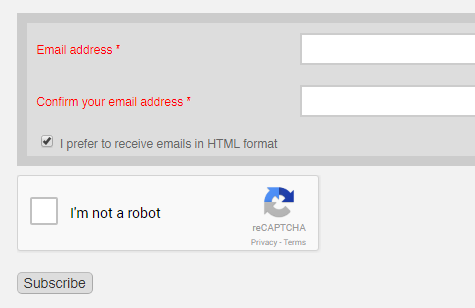
Then to add recatcha to the subscribe form:

 if (USE_SPAM_BLOCK) {
 $html .= '<div style="display:none"><input type="text" name="VerificationCodeX" value="" size="20"></div>';
 }
 $html .= '<p><script src="https://www.google.com/recaptcha/api.js" async defer></script><div class="g-recaptcha" data-sitekey="###YOUR-SITE-KEY###" ></div><br /><input type=submit name="subscribe" value="' . $GLOBALS['pagedata']['button'] . '" onClick="return checkform();"></p></form>';

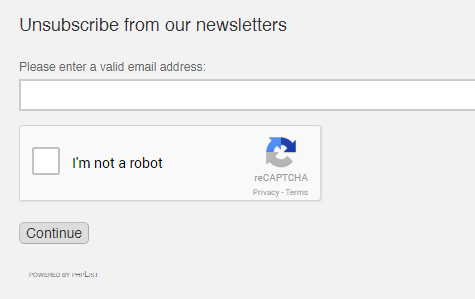
And finally the unsubscribe form:

 if (!$email) {
 $res .= '<script src="https://www.google.com/recaptcha/api.js" async defer></script><div class="g-recaptcha" data-sitekey="###YOUR-SITE-KEY###" ></div><br /><input type="submit" name="unsubscribe" value="' . $GLOBALS['strContinue'] . '"></form>';

There is another unsubscribe submit button:

        $res .= '<p><script src="https://www.google.com/recaptcha/api.js" async defer></script><div class="g-recaptcha" data-sitekey="###YOUR-SITE-KEY###" ></div><br /><input type=submit name="unsubscribe" value="' . $GLOBALS['strUnsubscribe'] . '"></p>';
The CSS I use for my PHPLIST instalation is:

#newsfeed,#forgotpassword-form,#context-menu,.buttonhelp {display: none;}
body #pushkacombutton,body #login{
 background-color: #4f8ff5 ;
 color: #fff !important;
 padding: 8px 30px !important;
 text-align: center ;
 white-space: nowrap ;
 vertical-align: middle ;
 -ms-touch-action: manipulation ;
 touch-action: manipulation ;
 cursor: pointer ;
 -webkit-user-select: none ;
 -moz-user-select: none ;
 -ms-user-select: none ;
 user-select: none ;
 background-image: none ;
 position: relative ;
 border: 0 ;
 margin: 10px 1px ;
 cursor: pointer ;
 border-radius: 2px ;
 text-decoration: none ;
 transition: background-color .2s ease,box-shadow .28s cubic-bezier(.4,0,.2,1) ;
 outline: none ;
 height: auto ;
 line-height: inherit ;
}
body #login:hover,body #login:active,body #pushkacombutton:hover,body #pushkacombutton:active{
 color: #fff !important;
 box-shadow: 0 1px 6px 0 rgba(0,0,0,.12), 0 1px 6px 0 rgba(0,0,0,.12) !important ;
 background-color: #1d3da8 !important ;
 background-image: none !important;
 -webkit-user-select: none !important ;
 -moz-user-select: none !important ;
 -ms-user-select: none !important ;
 user-select: none !important;
 background-image: none !important ;
 border: 0 !important ;
 border-radius: 2px !important ;
 outline: none !important ;height: auto ;line-height: inherit ;
 text-align: center ;
 white-space: nowrap ;
 vertical-align: middle ;
 -ms-touch-action: manipulation ;
 touch-action: manipulation ;
}

You can add an external style sheet to the header here:

Add to /list/admin/ui/dressprow/pagetop_minified.php

And you can replace the logo of the site here:

/list/admin/ui/dressprow/header.inc


DeviantART Story Contest – sub 500 words

I smell his scent on the air. There is cologne, and musty hair, and the all-encompassing gulf of sweat, and pheromones and testosterone; making me drunk with love. The taste of tobacco fills my mouth, and my heart races, as I push myself against him; legs feeling more and more weak. My thoughts lazily drift towards the musing that I may be getting addicted – though it would be easier to quit having never touched a cigarette in my life.

Music floods my veins. I laugh as I am carried forward in the currents of rhythm and dance. The saturated and rolled up bits of tissue paper in my ears block the deafening and brain-cutting noise; allowing for the enjoyment of it all. I am utterly lost in the sound.

Blood pumps. Clothes dampen. Pupils dilate. Eyes wander. Blood rushes.

I’m horizontal and can feel softness, but I’m falling back over and over again, and my head is spinning. He’s lying next to me, and I smile at his peaceful rest. My heart flutters and my stomach aches. Overcome by his beauty, I pull the pen out of my pocket and begin to paint his mysterious dark features which are spattered with dark hair. The three colours of paint I have are enough. The room is in hazy darkness and the drained hues are almost washed out completely. I’ll remember this moment forever, I decide – as I immortalise the strong and silent form. Feeling and emotion seeps into the canvass.

Where am I?

I look down. There’s a scrap of stained paper lying next to my leg with a sketch on it. It’s a shaky mess and it might resemble a human figure.

As the scrunched up ball of paper sails towards the trash can, a volt of stabbing agony shoots from front of eyes to back of skull.


WordPress Types Plugin output data sets using Get_Posts radio and checkboxes

You can use the WordPress Types Plugin to create custom groups of posts/pages type objects, which include the standard title, body WYSIWYG and featured image (or not), along with any number of any types of fields, checkbox, radio buttons etc. etc. 

Then you can use PHP/ Widgets on pages to output categories of data items

This will output all 

$pid = get_the_ID();
$argsDeals = array( 'post_type' => 'product-data-set', 'post_status' => 'publish','posts_per_page' => 50,
'meta_query' => array( array( 'wpcf-featured-item-list' => 'checkbox2' ,'value'=>'checkbox2' ,'compare' => 'LIKE' )) ,'meta_key' => 'wpcf-homepage-list-order','orderby' => 'meta_value_num','order' => 'ASC' );
$my_hotdeals = get_posts( $argsDeals );
foreach( $my_hotdeals as $post ) :
 setup_postdata($post);
 echo get_the_title($post->ID);
 echo get_permalink( $post->ID);
 if ( has_post_thumbnail($post->ID) ) {
 echo get_the_post_thumbnail($post->ID,'75square-thumb');
 }
 if (get_post_meta( $post->ID, 'wpcf-custom-text',true) != '') {
  echo get_post_meta($post->ID, 'wpcf-custom-text',true) ;
 }
endforeach;
wp_reset_query();

The text in bold is what you change depending on your custom posts/ fields. – they are in order:

  • Name of custom post type
  • Checkbox group with slug “featured-item-list
  • When the specific check box is ticked, the value is set to “checkbox2”
  • The homepage-list-order field is a numeric field for ordering the output
  • A text field with slug “custom-text”

You can also filter by comparing text fields or radio selectors (selecting a category)

It is the same as above, but instead you change the get post args:

$argsDeals = array( 'post_type' =>'product-data-set', 'post_status' => 'publish','posts_per_page' => 50,
 'meta_query' => array( array( 'wpcf-product-name' => 'yes', 'value' => 'item1', ) ),'meta_key' => 'wpcf-priority','orderby' => 'meta_value_num','order' => 'ASC', 'exclude' => $pid2 );

And the fields are similar except product-name is a radio button option which is matched to “item1” and priority is again a numeric field which orders the output.

To get a list of all checkbox values for a current product/ object – use this code to enter the checkbox values into an array:

$catlist = array();
if (get_post_meta( $post->ID, 'wpcf-featured-products',true) != '') {
 foreach (get_post_meta($post->ID, 'wpcf-featured-products',true) as $key => $value) {
 foreach ($value as $key2 => $value2) {
 $catlist[]=$value2;
 }
 }
}
foreach ($catlist as $key => $value) {
 echo $value . ' ';
}

This code would be inside the loop which considers and extracts data for one object

  • Checkbox list slug is featured-products
  • Array Featured-product ( Array $Key ( $Value2 = checkbox1 ) ) – loop through the inner array and copy to your own array to extract a list of category names
  • Print all the checkbox values for the current element you are considering

Send and receive custom domain email from Gmail for free with ZOHO

To send and receive email from a custom domain – like custom@pushka.com – from your Gmail email address – follow these steps:

  1. Go to https://mail.zoho.com and sign up with an existing domain (which you can register anywhere – even with me – https://envelopery.com/domains )
  2. Verify your domain by adding CNAME/ TXT records, or by uploading a file to the website
  3. Setup one account, which will be used for sending and receiving email.